8 Best Bird Feeder Cameras With No Subscription (October 2026)
The best bird feeder cameras without a subscription include the Humbirdy 4K Smart Bird Feeder with Camera for keeping bird clips, the Birdfy Metal 2 4K Smart Bird Feeder for exposed backyard mounts, and the Birdfy Premium Metal Solar Bird Feeder for everyday feeder watching.
On this page (8 sections)
- How we chose bird feeder cameras with no subscription
- The best no-subscription bird feeder cameras
- Which free features should you check before buying?
- How do Wi-Fi, mounting and sunlight affect your choice?
- How should you set up the feeder and app?
- What care keeps a camera feeder useful?
- Which buying mistakes cause the most trouble?
- Which bird feeder camera with no subscription should you choose?
The Humbirdy 4K Smart Bird Feeder with Camera is the best bird feeder camera with no subscription for most buyers because free AI identification and built-in storage cover the main daily tasks: watching, naming and saving bird visits.
Choose by the features you'll actually use without paying again. Someone who watches live needs a different storage plan from someone building a collection of favorite clips.
For broader choices, see our best bird feeder cameras roundup. Our guide to bird feeder cameras with an app explains the phone features worth comparing.
Our picks at a glance
-
1
 Best for keeping bird clips
Humbirdy 4K Smart Bird Feeder with Camera
8.0/10 our score
See it on Amazon -
2
 Best for exposed backyard mounts
Birdfy Metal 2 4K Smart Bird Feeder
7.8/10 our score
See it on Amazon -
3
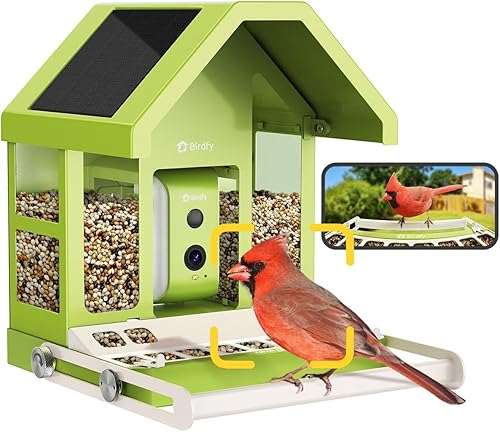 Best for everyday feeder watching
Birdfy Premium Metal Solar Bird Feeder
7.7/10 our score
See it on Amazon
- 4
 Check it
Birdfy 2 Pro Dual-Lens Bird Feeder
Best for watching bird behavior - 5
 Check it
Kiwibit 4K AI Camera Solar Bird Feeder
Best for card storage users - 6
 Check it
Kiwibit Solar 4K Live Video Bird Feeder
Best for distant family sharing - 7
 Check it
Birdfy Hanging Solar Bird Feeder
Best for garden hook setups - 8
 Check it
Nafnti 5GHz Smart Bird Feeder with Camera
Best for flexible backyard placement
How we chose bird feeder cameras with no subscription
Included AI and usable recording storage matter more here than resolution alone. We compared those features alongside network support, mounting, charging and access for feeder care.
A camera earns its place by fitting a clear buyer need. That might be saving clips locally, sharing visits with relatives or adding a camera to a hanging feeding station.
We kept the Kiwibit 4K AI Camera as a conditional option because its AI terms conflict. Free viewing still makes it useful, but buyers seeking fee-free identification should resolve that conflict first.
The scores stay consistent with the same products elsewhere on BusyAfternoon. Read the recommendations alongside them, since your mounting spot or storage needs can make a lower-scoring model the better fit.
| Product | Best for | Video | Storage | Wi-Fi | Our score |
|---|---|---|---|---|---|
| Humbirdy 4K Smart Bird Feeder with Camera | keeping bird clips | 4K live view at 30 fps | 32GB built-in local storage | 2.4GHz and 5GHz | 8.0 |
| Birdfy Metal 2 4K Smart Bird Feeder | exposed backyard mounts | 4K camera | 2.4GHz and 5GHz | 7.8 | |
| Birdfy Premium Metal Solar Bird Feeder | everyday feeder watching | 1080P camera | 7.7 | ||
| Birdfy 2 Pro Dual-Lens Bird Feeder | watching bird behavior | Free cloud storage | 7.6 | ||
| Kiwibit 4K AI Camera Solar Bird Feeder | card storage users | 4K live view | Micro SD up to 512GB or cloud | 2.4GHz only | 7.5 |
| Kiwibit Solar 4K Live Video Bird Feeder | distant family sharing | 4K video and 8MP photos | Cloud storage up to 60 days | 2.4GHz only | 7.3 |
| Birdfy Hanging Solar Bird Feeder | garden hook setups | 1080P live video | 7.0 | ||
| Nafnti 5GHz Smart Bird Feeder with Camera | flexible backyard placement | 2K live view | 2.4GHz and 5GHz | 6.9 |
The best no-subscription bird feeder cameras
Start with Humbirdy for local clip saving, then compare the alternatives by feeding style and how you want to watch. Each recommendation below includes a reason to choose it and a reason to move on.
Humbirdy 4K Smart Bird Feeder with Camera: Best for keeping bird clips
- 4K live view at 30 fps
- Free AI identification
- 32GB built-in local storage
- 2.4GHz and 5GHz Wi-Fi
Humbirdy includes free AI and built-in storage for buyers who want to keep bird clips without a cloud plan. Its removable camera also makes charging and feeder care easier to manage.
Pros
- Free AI identification and clip saving
- Local storage included
- Removable camera for charging and cleaning
Cons
- Close-focus portrait view favors feeder visits
- App access remains part of the experience
Humbirdy suits buyers who want the main camera features included from the start. Free AI and 32GB of built-in local storage remove the need to choose a cloud plan or buy a separate card for basic saving.
Its 4K live view runs at 30 fps, while a separate 1080P mode records at 120 fps for slow-motion clips. Choose that feature if watching landings and wing movements interests you more than collecting still photos alone.
The portrait camera favors close feeder visits, with a clear focus range of 0–5 in. Skip it if your main goal is watching birds across a broad stretch of garden.
A detachable camera makes indoor charging and feeder cleaning easier to separate. The metal body, included 3W solar panel and support for both Wi-Fi bands round out a useful everyday setup.
Before filling the feeder, check the view with the perch in place. A close-focus camera benefits from careful framing rather than simply pointing it toward the yard.
Birdfy Metal 2 4K Smart Bird Feeder: Best for exposed backyard mounts
- 4K camera
- Free AI identification
- All-metal body
- 2.4GHz and 5GHz Wi-Fi
The metal body, IP66 protection and multiple mounting options suit a permanent backyard feeding station. Free AI and dual-band Wi-Fi keep the camera useful without a recurring identification fee.
Pros
- Free lifetime AI identification
- Metal body with IP66 protection
- Pole, pole-top, wall and tree mounting
Cons
- 6 lb empty weight requires a strong mount
- Storage method and retention need confirmation
Birdfy Metal 2 4K suits a permanent outdoor feeding station where body material and mounting choices carry weight. It has an all-metal body, IP66 protection and options for pole, pole-top, wall or tree installation.
Its 1.8L hopper and adjustable beech wood perch let you plan around feeding access and camera distance. The empty feeder weighs 6 lb, so account for the added seed load when choosing hardware and a support.
The camera combines 4K video, full-color and infrared night vision, plus free lifetime identification. Dual-band Wi-Fi gives you a choice of networks at the mounting spot.
Birdfy also advertises continuous recording, but confirm the storage method and retention limits if an archive is essential. Recording capability and a usable long-term clip library are separate buying decisions.
Choose it for a substantial metal feeder with flexible installation. Skip it if your available support is light or you want built-in local storage clearly included.
Our guide to whether Birdfy needs a subscription explains why the exact model matters.
Birdfy Premium Metal Solar Bird Feeder: Best for everyday feeder watching
- Free AI bird identification
- Built-in solar charging
- 1080P camera
- Metal body
Choose this metal Birdfy for casual phone viewing and free species identification. Its adjustable perch and easy-refill top matter more for daily feeding than a higher video resolution.
Pros
- Lifetime AI identification included
- Adjustable perch and easy-refill top
- Metal construction with solar charging
Cons
- 1080P video limits fine-detail cropping
- 2.4GHz Wi-Fi only
- 7.3 lb empty weight
Birdfy Premium Metal Solar suits buyers who mainly want daily phone viewing and species names. Its 1080P camera is a sensible fit when you watch the whole frame rather than crop small feather details.
The metal body has an adjustable perch and an easy-refill top. Those features help you arrange the feeding position and reach the seed opening without rebuilding the setup.
A built-in 2W solar panel works with a 9000mAh battery, while full-color night vision adds another viewing mode. Plan the mounting spot around sunlight as well as the birds' approach.
This is a heavy feeder at 7.3 lb empty, with a stated seed capacity of 5.3 lb. Use a support suited to the filled load and leave room above it for refilling.
Choose it if your 2.4GHz network reaches the feeding spot and you prefer metal construction. Skip it for fine-detail cropping or a light hanging support, and consider the Metal 2 above if you need either Wi-Fi band.
Birdfy 2 Pro Dual-Lens Bird Feeder: Best for watching bird behavior
- 2K tracking close-up and 1080P wide lens
- Free AI bird identification
- Free cloud storage
- Birdwatching recaps
The close-up and wide lenses suit bird watchers who want both feather detail and feeding context. Included AI, cloud storage and recaps support watching later as well as checking live.
Pros
- Tracking close-up and wide feeding views
- Free AI and cloud storage
- Multi-account access and birdwatching recaps
Cons
- 2.4GHz Wi-Fi only
- Mixed plastic and metal construction
- Cloud retention limits need confirmation
Birdfy 2 Pro suits people who want to follow bird behavior as well as see close-ups. A tracking 2K lens follows the bird while a 1080P wide lens shows more of the feeding scene.
That second view can help you understand a visit: where the bird landed, how it approached the food and what happened outside the close-up frame. Skip the extra camera system if you only want a quick live check.
Free AI, cloud storage, birdwatching recaps and multi-account access support watching later with other people. Confirm the cloud retention window if you want to browse older visits rather than save selected highlights.
The feeder uses 2.4GHz Wi-Fi and includes a 3W solar panel with a 9000mAh battery. Its body combines plastic and metal, so choose a metal Birdfy instead if that construction is your priority.
For an app-tier comparison, see Bird Buddy Premium vs Free. Compare the included tools individually rather than assuming every brand uses the same free-plan rules.
Kiwibit 4K AI Camera Solar Bird Feeder: Best for card storage users
- 4K live view
- Free viewing, playback and motion alerts
- Micro SD support up to 512GB
- Adjustable solar panel
This Kiwibit suits buyers who want free viewing and removable-card storage. Its AI terms conflict, so it is a conditional choice for anyone who requires free species identification.
Pros
- Free live view, playback and alerts
- Local storage on a removable card
- Adjustable solar panel and detachable feeder
Cons
- Conflicting terms for included AI access
- Micro SD card sold separately
- 2.4GHz Wi-Fi only
The Kiwibit 4K AI Camera suits buyers who prioritize free viewing and removable-card storage. Live view, playback and motion alerts are free, but Kiwibit's statements about included AI access conflict.
One set of terms includes lifetime recognition, while another says recognition requires a subscription. Confirm the exact AI package before ordering if automatic species names are a must-have.
Local storage supports a Micro SD card up to 512GB, bought separately. That makes it an option for people comfortable choosing and managing a card rather than relying only on online history.
An adjustable 3W solar panel lets you change its angle for sunlight. The detachable feeder has a 1.5L dual-compartment body, and its battery can be removed for USB-C charging.
Choose it if card storage and a movable panel fit your routine. Skip it while the AI terms remain unresolved if the whole reason for buying is identification without recurring fees.
Our guide to smart bird feeders explains how viewing, alerts and recognition serve different needs.
Kiwibit Solar 4K Live Video Bird Feeder: Best for distant family sharing
- 4K video and 8MP photos
- Lifetime AI identification
- Cloud history up to 60 days
- Sharing with up to 20 people
Included lifetime AI, cloud history and shared access suit families watching the same feeder from different homes. Local Micro SD support provides another way to keep favorite visits.
Pros
- Lifetime AI identification included
- Cloud recordings and family sharing
- Detachable feeder for cleaning
Cons
- 2.4GHz Wi-Fi only
- Included cloud recordings limited to 3 minutes
- Cloud history is not a permanent archive
Kiwibit Solar 4K Live Video suits families watching from different homes. It includes lifetime AI recognition and shared access for up to 20 relatives or friends.
The included cloud history extends up to 60 days for recordings up to 3 minutes long. That fits revisiting recent activity, but download important moments rather than treating the cloud window as a permanent collection.
Its 4K video, 8MP photos and 132° view suit people who want both moving clips and still images. Local Micro SD support provides another storage route if you prefer keeping a copy at the feeder.
A detachable 1.5L body helps with routine cleaning, while dual solar panels support the rechargeable battery. It needs a usable 2.4GHz signal where you install it.
Choose this model if sharing and recent cloud history matter more than metal construction. Skip it if you need 5GHz support or want included cloud clips longer than the stated limit.
For a gift, help the recipient set up sharing before inviting everyone else.
Birdfy Hanging Solar Bird Feeder: Best for garden hook setups
- Lifetime AI identification
- Hanging metal body with suet cages
- 1080P live video
- 60 fps slow-motion playback
This hanging Birdfy suits a strong garden hook or branch where you want to offer seed and suet together. Its metal body, removable roof and free AI serve a feeding station without a wall bracket.
Pros
- Lifetime AI identification included
- Seed hopper and side suet cages
- Removable roof and metal construction
Cons
- Needs a stable hanging point
- 2.4GHz Wi-Fi only
- 1080P rather than 4K video
Birdfy Hanging Solar suits a garden hook or suitable branch where a fixed wall mount would be awkward. Its stainless steel hanging cable supports a metal feeder with a 1.7L seed container and side suet cages.
Offering seed and suet gives you 2 food options in the same station. Keep the cages reachable, since they add feeding surfaces that need regular attention alongside the hopper.
The camera provides 1080P live video and 60 fps slow-motion playback. Lifetime AI identification adds species names without a recurring fee.
A 3W solar panel and 5200mAh battery support outdoor use, with a removable roof for feeder access. It connects through 2.4GHz Wi-Fi only.
Choose it if your hanging point is sturdy, within network range and easy to reach. Skip it if the feeder would swing into a fence, sit beyond safe cleaning access or hang in deep shade all day.
Leave clearance around the body before adding food. A convenient hook needs enough room for the feeder and visiting birds.
Nafnti 5GHz Smart Bird Feeder with Camera: Best for flexible backyard placement
- Free AI identification
- 2K live view
- 2.4GHz and 5GHz Wi-Fi
- Slide-lock mounting bracket
Nafnti combines dual-band Wi-Fi with wall, fence, tree and pole installation options. Its slide-lock bracket and wide refill opening suit buyers who need convenient access for regular feeder care.
Pros
- Free AI bird identification
- Dual-band Wi-Fi
- Slide-lock bracket and wide refill opening
Cons
- Plastic body with metal seed components
- Storage method and retention need confirmation
- 1.2L hopper needs attention at busy feeders
Nafnti suits buyers who need several placement options and either Wi-Fi band. It can mount on a wall, fence, tree or 1-inch pole, and the body slides into its bracket.
The wide refill opening helps when pouring seed, while the 1.2L hopper suits someone able to check food levels regularly. A busy feeding spot may need more frequent attention than a larger hopper.
Its 2K camera has a 160° view, color night vision and two-way audio. Free AI recognition adds species information, but the audio feature is best approached as another viewing tool rather than a reason to disturb feeding birds.
The body is plastic with metal seed components. Nafnti pairs it with a built-in 3W solar panel and a 5200mAh battery.
Choose it for mounting flexibility and convenient feeder removal. Skip it if an all-metal body or clearly defined recording storage is essential.
If saving clips drives your decision, confirm the storage method and retention before choosing this camera over one with an explicit local-storage option.
Which free features should you check before buying?
Separate live viewing, alerts, AI identification and recording storage before comparing cameras. A no-fee camera can meet one need without covering all 4.
Does a no-subscription bird feeder camera include free AI?
Free AI must be included in the exact package you choose. A free app or free live stream alone doesn't establish whether species recognition is included.
Humbirdy and the Birdfy models here include recognition, as does Kiwibit Solar 4K Live Video. The other Kiwibit needs clarification because its AI terms conflict.
Use automatic names as a starting point for learning. Compare unfamiliar results with the bird's markings, size and local range, especially when only part of a bird appears in the frame.
Is local storage or cloud history better for you?
Local storage fits people who want control over saved files, while cloud history fits people who prefer browsing recent visits through an app. Neither replaces a separate copy of clips you want to keep.
A built-in storage option reduces setup choices. A removable card adds flexibility, but you must choose a compatible card and learn how the camera handles a full card.
Before relying on local storage, check how downloads and playback work. A camera saving files locally does not automatically mean every app feature works without an internet connection.
Cloud history has a time window, and some services also limit clip length. Decide whether you want yesterday's highlights or an archive spanning several seasons.
Does family sharing include the access you need?
Look for the difference between shared playback and simultaneous live viewing. A large sharing allowance does not always mean everyone can open the live stream together.
Give each person their own account where supported instead of passing around the main login. Keep account recovery details with the person responsible for the feeder.
How do Wi-Fi, mounting and sunlight affect your choice?
Choose the location before choosing the camera, because weak coverage or poor access can outweigh better video. The spot needs a usable signal, a secure support and a practical cleaning route.
Choose the Wi-Fi band by outdoor reach
A 2.4GHz connection often reaches farther through obstacles, while 5GHz can offer more capacity nearby. Either can work well when the signal reaches the feeder reliably.
Check your phone's connection at the intended height and location, then pair the camera near the router before moving it outdoors. A phone signal check is a useful first step, though the camera's connection is the deciding check.
If your network requires that band, see our bird feeder cameras with 5GHz Wi-Fi guide. Remember that 5GHz Wi-Fi and cellular 5G are different things.
Match the mount to the filled feeder
Use the feeder's filled weight, including food and accessories, when planning support. An empty-weight figure alone is not enough for selecting a bracket or hook.
Leave space to lift a roof, remove a camera or slide the body off its bracket. A mount that blocks those movements turns simple care into a larger job.
Give solar charging a workable position
Solar panels need useful sunlight, not just an outdoor location. Watch where shadows fall across the proposed spot before attaching the feeder.
Heavy camera use and long cloudy spells can increase the need for manual charging. Keep the charging route practical, and check battery levels during the first week rather than assuming solar removes all maintenance.
How should you set up the feeder and app?
Pair indoors, check the outdoor view and add food last. This order helps separate account or network problems from placement problems.
- Charge and pair the camera. Follow its instructions, secure the account and confirm that live view opens.
- Check the intended location. Open the feed outdoors and make sure the connection remains usable before fixing the mount.
- Frame the feeding area. Keep the perch and food access visible, and avoid aiming into strong glare.
- Check saving and playback. Capture a short clip through the available controls, replay it and download a copy.
- Set useful alerts. Start with the available defaults, then adjust supported settings if notifications become distracting.
- Add fresh food. Keep the camera position steady while birds get used to the station.
Our bird feeder camera setup guide covers the process in more detail. Save the account recovery information before treating setup as complete.
New feeders may take time to attract visitors. Avoid moving the station repeatedly just because the first day is quiet.
What care keeps a camera feeder useful?
Clean feeding surfaces, keep seed dry and protect the camera during washing. The feeder needs food hygiene as well as a clear lens.
Check food after rain and discard seed that is damp, clumped or moldy. Refill according to how quickly birds eat, rather than keeping the hopper full by habit.
Remove electronic parts as the instructions allow before washing. An outdoor weather-protection claim does not mean the whole feeder can be soaked or cleaned with a pressure hose.
Wash feeder parts with a bird-feeder-safe method, rinse thoroughly and let them dry before adding seed. Our guide to cleaning a smart bird feeder explains how to handle the food areas and camera separately.
Clear loose debris from the lens and solar panel gently, using a soft cloth suited to the surface. Check brackets, straps and hanging points during refills, especially after strong wind.
Treat metal bodies and seed guards as parts of squirrel management, not a substitute for placement. Nearby branches and structures can give squirrels access even when they cannot chew through a feeder wall.
Which buying mistakes cause the most trouble?
Buying on the words “no subscription” alone is the main mistake. Make a short list of the activities you expect to do free, then match each one to an included feature.
- Confusing playback with an archive: recent history may expire, so export favorite clips.
- Choosing resolution before framing: a clear view of the perch matters more than extra pixels pointed at the wrong area.
- Overlooking required extras: a storage card, suitable pole or stronger mount may still be needed.
- Assuming solar means no charging: shade and camera use affect the balance.
- Treating a metal feeder as unreachable: squirrel access also depends on nearby launch points.
- Buying a gift without planning care: the recipient needs network access, account help and a reachable feeding station.
Free app features remain tied to the service and its terms. Keep important clips backed up so your collection does not depend entirely on one account.
For another brand's approach to free and paid access, read our Bird Buddy subscription guide.
Which bird feeder camera with no subscription should you choose?
Choose Humbirdy if keeping clips without a cloud plan is your first priority. Choose Birdfy Metal 2 4K for a metal station with multiple mounting options, or Premium Metal for everyday viewing when 1080P is enough.
Pick Birdfy 2 Pro to follow behavior through close and wide views. Kiwibit Solar 4K Live Video suits shared family watching, while the hanging Birdfy fits an existing garden hook with room for seed and suet.
Nafnti fits flexible mounting and dual-band needs. Choose the other Kiwibit for card storage only after resolving its AI terms if free identification matters to you.
The right bird feeder camera with no subscription covers your viewing and saving habits at a spot you can maintain. Use our bird feeder camera guide to settle placement and feeding style before choosing extra camera features.
Our top 3 picks at a glance
-
1
Best for keeping bird clips
Humbirdy 4K Smart Bird Feeder with Camera
8.0/10 our score
See it on Amazon -
2
Best for exposed backyard mounts
Birdfy Metal 2 4K Smart Bird Feeder
7.8/10 our score
See it on Amazon -
3
Best for everyday feeder watching
Birdfy Premium Metal Solar Bird Feeder
7.7/10 our score
See it on Amazon
Frequently asked questions
What is the best bird feeder camera with no subscription?
Humbirdy is our top choice because it combines free AI identification with built-in local storage. That covers both naming visitors and keeping clips without a cloud plan.
Choose Birdfy Metal 2 4K instead if a metal feeding station and several mounting options are your main priorities.
Do bird feeder cameras need a subscription?
No, a subscription is not required for every bird feeder camera. The models here offer viewing and other features without recurring fees, but AI access and recording storage need separate checks.
Choose by the exact camera package, since free live viewing does not automatically include every cloud or identification tool.
Can I save bird feeder camera videos without cloud storage?
Yes, choose a model with local storage if you want to save visits without relying on cloud history. Humbirdy includes built-in storage, and both Kiwibit models support Micro SD cards.
Download favorite clips to another device too, since storage inside an outdoor feeder should not be your only copy.
Can a no-subscription bird feeder camera identify birds?
Yes, several cameras include free or lifetime AI identification, including Humbirdy and the Birdfy models here. Kiwibit Solar 4K Live Video also includes lifetime AI.
The Kiwibit 4K AI Camera model has conflicting access terms, so resolve that point before choosing it mainly for species names.
Do these bird feeder cameras work with 5GHz Wi-Fi?
Humbirdy, Birdfy Metal 2 4K and Nafnti support both 2.4GHz and 5GHz Wi-Fi. The other picks here use 2.4GHz only.
Choose the band that reaches your feeder reliably, since a faster indoor connection does not ensure better outdoor coverage through walls, foliage or other obstacles.



