6 Best Bird Feeder Cameras With an App (October 2026)
The best bird feeders with camera and app include the Bird Buddy Pro Solar Smart Bird Feeder for curious backyard birders, the Birdfy 60FPS Solar Smart Bird Feeder for action clip fans, and the Birdfy Premium Metal Solar Bird Feeder for busy feeding stations.
On this page (7 sections)
- Which bird feeder with camera and app fits your routine?
- Which app functions will you actually use?
- Will your Wi-Fi and mounting spot work?
- How do you set up the feeder without repeat work?
- How much care does a camera feeder need?
- Which buying mistakes should you avoid?
- Which bird feeder with camera and app should you choose?
The Bird Buddy Pro Solar Smart Bird Feeder is our top bird feeder with camera and app for people who want to learn about visiting birds and share the experience. Choose the Birdfy 60FPS Solar Smart Bird Feeder if free AI identification and slow-motion clips matter more.
Start with what you'll do on your phone: watch live, save favorite visits, identify birds or invite family. Then choose a feeder you can connect, refill and clean without turning each task into a project.
For a broader look at camera quality and feeder styles, see our guide to the best bird feeder cameras. If recurring fees are your main concern, compare bird feeder cameras with no subscription.
Our picks at a glance
-
1
 Best for curious backyard birders
Bird Buddy Pro Solar Smart Bird Feeder
8.6/10 our score
See it on Amazon -
2

-
3
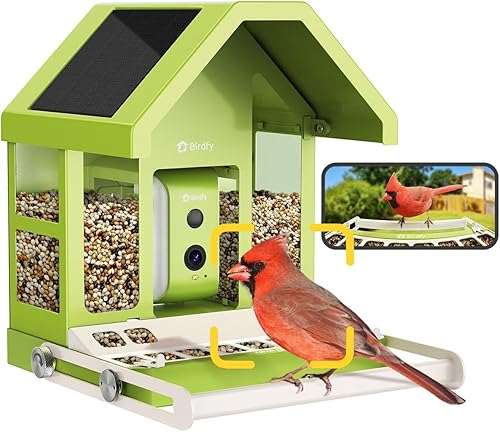 Best for busy feeding stations
Birdfy Premium Metal Solar Bird Feeder
7.7/10 our score
See it on Amazon
- 4
 Check it
NETVUE Birdfy AI Bird ID Bird Feeder
Best for low-light watchers - 5
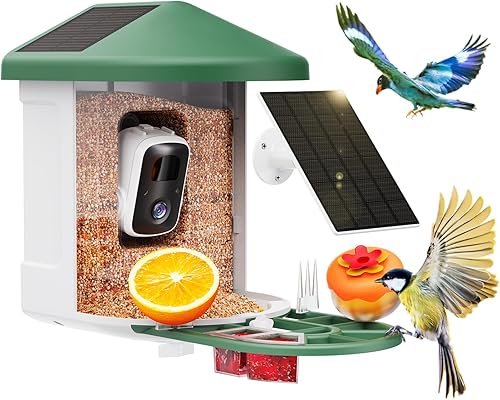 Check it
HARYMOR Solar Smart Bird Feeder
Best for saving clips locally - 6
 Check it
HARYMOR 2K Solar Smart Bird Feeder
Best for family viewing sessions
Which bird feeder with camera and app fits your routine?
Bird Buddy suits learning and sharing; Birdfy 60FPS suits action clips without an AI subscription. The other picks serve more specific needs, including metal construction, infrared viewing and local recording.
We compared included app functions, recording options, mounting and routine care alongside camera features. A higher-resolution camera won't make up for weak yard Wi-Fi or a feeder that's difficult to reach.
| Product | Best for | Camera | Power | Wi-Fi | Our score |
|---|---|---|---|---|---|
| Bird Buddy Pro Solar Smart Bird Feeder | curious backyard birders | 2K video, 5MP photos | Rechargeable battery with solar or USB-C charging | 2.4 GHz | 8.6 |
| Birdfy 60FPS Solar Smart Bird Feeder | action clip fans | 1080P video, 60FPS capture | Built-in solar panel and 5200mAh rechargeable battery | 2.4 GHz | 8.2 |
| Birdfy Premium Metal Solar Bird Feeder | busy feeding stations | 1080P video | Built-in 2W solar panel and 9000mAh battery | 2.4 GHz | 7.7 |
| NETVUE Birdfy AI Bird ID Bird Feeder | low-light watchers | 1080P video with infrared night vision | Solar powered | 2.4 GHz, with Bluetooth pairing | 7.2 |
| HARYMOR Solar Smart Bird Feeder | saving clips locally | 2K video, 120-degree view | Built-in 3W panel and external 3W solar panel | 2.4 GHz | 7.1 |
| HARYMOR 2K Solar Smart Bird Feeder | family viewing sessions | 2K video, 120-degree view | Roof-mounted solar panels and external solar panel | 6.9 |
Bird Buddy Pro Solar Smart Bird Feeder: Best for curious backyard birders
- 2K video and 5MP photos
- Core species ID and live streaming included
- Solar roof and USB-C charging
- Premium required for advanced app features
Choose Bird Buddy for an app centered on learning about visiting birds and sharing their visits. Core features are free, while advanced identification and insights require Premium.
Pros
- Core species ID and live streaming included
- Invite up to 10 people
- Solar roof and hanger included
Cons
- Advanced app features require Premium
- 0.9 L seed capacity
Choose Bird Buddy for a deeper birdwatching app experience. Premium adds individual bird identification, recognition of other animal visitors, personalized collections and wildlife insights.
Core species identification, live streaming, bird postcards and sharing remain free. Start there if you're unsure how often you'll use the app, then consider Premium once you know which extra functions you want.
The camera records 2K video and 5MP photos, with HDR for scenes containing bright and shaded areas. Those features suit people who enjoy studying feather details as well as watching brief visits.
You can invite up to 10 people, making this a useful choice for a wider family group. The included hanger gives you a branch-hanging option, while pole mounting requires a separate pole.
Its 0.9 L container suits someone who can check seed regularly. Skip it if your main goal is fewer refills or if you want advanced identification without an ongoing plan.
Read what a Bird Buddy subscription includes before paying for features beyond the core app.
Birdfy 60FPS Solar Smart Bird Feeder: Best for action clip fans
- 1080P side-view camera
- 60FPS high-frame-rate capture
- Lifetime free AI bird identification
- Free cloud storage with 30-day retention
Birdfy suits people who want to slow down wing movements and follow repeat visitors without paying for AI identification. Tool-free cleaning also helps with routine care.
Pros
- Lifetime free AI bird identification
- 60FPS mode for slowing down action
- Tool-free cleaning design
Cons
- 1080P video rather than 2K
- Cloud clips need saving before retention ends
Choose Birdfy 60FPS if quick movements are the moments you want to keep. Its high-frame-rate mode captures wing flaps and takeoffs for slowing down afterward, while the side-mounted camera gives a close view of feeding birds.
The 1080P camera favors motion capture over the higher resolution offered by some other picks. Skip it if your first priority is a 2K image for examining still details.
Lifetime free AI identification includes information such as juvenile, male or female identification. Bird Data tracks repeat visits, activity trends and seasonal changes, giving you more to follow than a stream of arrival notifications.
Free cloud storage retains videos for 30 days. Download favorite clips before that window ends rather than treating the cloud history as a permanent collection.
The fir wood feeder holds 1.3 L and opens for tool-free cleaning. Its roof-integrated solar panel works with a 5200mAh battery, so choose a position that gives the roof useful sunlight.
This is the clearest alternative to Bird Buddy for someone who wants ongoing identification without an AI fee. Our Bird Buddy vs Birdfy comparison explains the wider choice between these brands.
Birdfy Premium Metal Solar Bird Feeder: Best for busy feeding stations
- Metal body with easy-refill top
- 1080P camera with full-color night vision
- Lifetime AI bird identification without a subscription
- Built-in 2W solar panel and 9000mAh battery
This metal Birdfy suits an established feeding spot where seed capacity and top access matter. Its app includes lifetime AI identification without a subscription.
Pros
- 5.3 lb seed capacity
- Easy-refill top and adjustable perch
- Lifetime AI identification included
Cons
- 7.3 lb feeder needs a suitable support
- 1080P video rather than 2K
Choose the Birdfy Premium Metal for an established feeding station with frequent visitors. Its 5.3 lb seed capacity and easy-refill top suit a spot where a small container would need frequent attention.
Capacity doesn't remove the need to inspect seed. In damp weather or a quiet yard, fill only what birds can use before it becomes wet or stale.
The metal body weighs 7.3 lb before seed, so plan the support before buying. A sound pole, wall or tree mount matters more here than choosing the easiest nearby branch.
An adjustable perch helps you arrange the feeding position. The camera provides 1080P video and full-color night vision, while lifetime AI identification is included without a subscription.
A built-in 2W solar panel and 9000mAh battery support outdoor use. Sunlight and camera activity still affect charging needs, so keep the feeder reachable for manual charging.
Skip this model if you need a lighter feeder or prioritize higher video resolution. For a different metal-camera comparison, see Birdfy Metal 2 4K vs Kiwibit 2 Pro, which covers separate models.
NETVUE Birdfy AI Bird ID Bird Feeder: Best for low-light watchers
- 1080P camera with infrared night vision
- AI identification and app alerts
- Bluetooth pairing and 2.4 GHz Wi-Fi
- Manual app-controlled squirrel deterrents
NETVUE suits viewers who want infrared night viewing and several mounting choices. Its squirrel controls require you to act through the app.
Pros
- Infrared night vision
- AI identification without a subscription
- Pole, tree and wall mounting tools included
Cons
- Squirrel deterrents require manual action
- 1080P video rather than 2K
Choose NETVUE for infrared viewing and flexible mounting. Its 1080P camera can show activity in low light, though most backyard seed-feeding birds are active during daylight.
Night vision is useful for checking visitors after dusk. It shouldn't outweigh camera placement and daytime image quality if your main interest is watching birds eat.
The adjustable camera lets you aim toward the feeding area. Included pole, tree and wall mounting tools give you choices when the sunniest spot differs from the easiest installation point.
Its 1.5 L container offers a middle ground between a compact feeder and a larger seed store. The IP65-rated housing provides weather protection, but the seed tray still needs regular inspection after rain.
The app offers manual flashing lights, warning sounds and speech through the microphone for squirrel control. These require your attention, so skip this model if you're expecting a deterrent that acts while you ignore alerts.
AI identification is available without a subscription. Check whether Birdfy needs a subscription if you want to separate identification from other app services.
HARYMOR Solar Smart Bird Feeder: Best for saving clips locally
- 2K video and 120-degree view
- 2 L seed container
- Built-in and external solar panels
- Optional memory card storage up to 128GB
Choose this HARYMOR for local recording, a larger seed container and a separate solar panel you can place in sunlight. Detailed bird information requires a subscription.
Pros
- Optional local memory card storage
- 2 L seed container
- Separate external solar panel
Cons
- Memory card sold separately
- Detailed AI bird information requires a subscription
- Wall or tree mounting only
Choose this HARYMOR if local clip storage is a priority. It accepts a memory card up to 128GB, sold separately, alongside a cloud option with a 3-day recording loop and a 2-year trial.
A trial and a retention window describe different things. The trial covers access for a period; the short loop means older cloud clips are replaced as new footage arrives.
Its 2 L seed container, 2K camera and 120-degree view suit someone who wants a broad feeding scene and room for seed. Detailed information about identified birds requires an app subscription.
The built-in and external solar panels are each rated at 3W. A separate panel gives you more placement freedom when the feeder belongs near cover but the best sunlight falls elsewhere.
HARYMOR recommends more than 12 hours of sunshine per week in sunny conditions. Keep a manual charging plan for periods of poor light.
Choose a wall or tree location, since this model isn't designed to hang. Skip it if branch hanging is essential, and follow our guide to setting up a bird feeder camera before mounting it.
HARYMOR 2K Solar Smart Bird Feeder: Best for family viewing sessions
- 2K video and 120-degree view
- Share live viewing with up to 4 people
- Solar-powered roof and adjustable external panel
- AI identification requires a subscription
This HARYMOR suits families planning to watch visits together and try different feeding accessories. It supports local storage, but AI identification requires a subscription.
Pros
- Shared live viewing with up to 4 people
- Fruit fork, jelly cup and honey jar included
- Several mounting options
Cons
- AI identification requires a subscription
- Pole and memory card sold separately
- Siren requires manual app control
Choose this HARYMOR for planned family viewing sessions and varied feeding accessories. It supports shared live viewing with up to 4 people and includes a fruit fork, jelly cup and honey jar.
Use each accessory only with food suited to the birds you want to attract. Extra food types also mean extra washing, so start with the seed container before adding several foods at once.
The camera provides 2K video and a 120-degree view, and HARYMOR suggests tilting it down about 15 degrees for a clearer view of feeding birds. Make small adjustments while checking the live image.
A tree strap, wall or fence bracket, and pole-mount base give you several installation choices. The pole is separate; confirm its fit before ordering hardware.
Roof-mounted solar panels work with an adjustable external panel. Local memory card storage is available up to 128GB, with the card sold separately.
Skip it if free AI identification is essential, since that feature requires a subscription. Its app siren also needs manual activation, so the mesh barrier shouldn't be your only squirrel-control measure.
Our solar bird feeder camera guide covers the placement trade-offs behind solar-assisted charging.
Which app functions will you actually use?
Choose your essential app functions before comparing camera resolution. Live viewing, identification, saved recordings and sharing solve different needs, and paying for all of them makes little sense if you only want arrival alerts.
What should a bird feeder camera and app let you do?
Start with watching a visit and finding it again afterward. A useful routine is opening an alert, checking the bird, then saving the clip if it's worth keeping.
Think about when you'll use the app. Someone working away from home may value a clip history more than a live stream, while a retired family member may enjoy opening the camera throughout the day.
Treat AI names as a starting point for learning. Similar species, partial views and young birds can make identification difficult, so compare markings before sharing a name as certain.
Should you pay for identification?
Pay for advanced identification only if you'll use the added detail. A basic species name may be enough for casual viewing, while repeat-visitor records and individual recognition suit people building a closer picture of their yard.
Separate identification fees from storage fees. An included AI feature doesn't automatically tell you how long clips remain available or which other services are free.
Bird Buddy's feature split deserves particular attention because core species ID and advanced identification are different offers. Our Bird Buddy Premium vs Free guide explains that distinction.
How much sharing access do you need?
Count the people who will watch before choosing a feeder. Inviting relatives to view occasional clips is different from arranging a live session with several people at once.
Use separate invitations where available, and keep the main account under the person responsible for the feeder. That makes it easier to remove access or manage settings later.
For a gift, agree who will handle charging, cleaning and connection problems. The recipient needs both a compatible phone and a manageable place to maintain the feeder.
Will your Wi-Fi and mounting spot work?
Confirm outdoor connection quality before drilling or fastening brackets. Bird Buddy, both Birdfy models, NETVUE and the HARYMOR Solar Smart model use 2.4 GHz Wi-Fi; confirm the HARYMOR 2K Solar model's requirements before buying.
A dual-band router can provide 2.4 GHz even if your phone usually connects on 5 GHz. Bluetooth helps pair some cameras, but it doesn't replace the feeder's Wi-Fi connection.
Take your phone to the proposed spot as an early signal check, then confirm the camera connects there before making the mount permanent. Walls, distance and nearby structures can affect the connection.
Choose a spot that balances signal, sunlight and access. A farther corner may look attractive, but it becomes a poor choice if every refill requires a ladder or the app frequently loses contact.
Keep the lens aimed at your feeding area and away from neighbors' windows. Avoid pointing directly toward strong sun, which can leave birds in shadow or wash out the image.
Use a firm support that can carry the filled feeder. For help choosing between poles, walls and branches, read our guide to mounting a smart bird feeder.
How do you set up the feeder without repeat work?
Charge and connect the camera indoors first, then confirm its position outdoors. This keeps account setup, permissions and charging separate from climbing or handling mounting hardware.
- Create the account and charge the camera. Keep the phone nearby and follow the app's pairing steps.
- Connect to the required Wi-Fi band. Allow the permissions needed for pairing and arrival notifications.
- Check the intended outdoor position. Open the live view and confirm that the feeding area is visible.
- Secure the feeder and panels. Route any panel cable so it doesn't pull on a connector or obstruct access.
- Add a modest amount of fresh seed. Confirm that openings and drainage paths remain clear.
- Check the first recordings. Adjust the camera angle and alert settings based on what appears in frame.
Start with basic notifications enabled so you can learn how the app behaves. Once visits become regular, use the available controls to reduce interruptions without losing the moments you care about.
Give birds time to find a new feeding spot. Moving the feeder repeatedly because it has no visitors can make it harder to judge whether the location works.
If the live view won't load, check battery level and connection before changing several settings. Our guide to why Bird Buddy keeps going offline helps Bird Buddy users narrow down common causes.
How much care does a camera feeder need?
Inspect food and feeding surfaces regularly, and keep electronics out of cleaning water. Solar charging reduces one chore, but it doesn't remove seed checks, washing or lens care.
Check after rain for damp seed, clumps and debris. Empty spoiled food rather than covering it with fresh seed, and let washed parts dry fully before refilling.
Follow the feeder's cleaning directions and separate removable food-contact parts from camera parts as instructed. Our guide to cleaning a smart bird feeder walks through the care process.
Wipe a dirty lens with a soft cloth suited to camera glass. A close-up camera can make a small smear, seed dust or water spot look much larger in the image.
Keep solar surfaces clear of fallen leaves and dirt. Check their exposure again when seasons change, since a spot with good summer sun can become shaded later.
Download favorite recordings on a regular schedule. A retention window is easy to forget until a visit you wanted has already disappeared.
Which buying mistakes should you avoid?
Avoid choosing by resolution, solar power or squirrel claims alone. The right feeder must also fit your yard, storage habits and willingness to maintain it.
Buying the biggest container for a quiet yard
A larger hopper helps only when birds use the food promptly. Start with smaller fills until you know how quickly seed moves, especially during damp weather.
Seed capacities given in liters and pounds aren't directly comparable without knowing the seed mix. Use them as capacity guides rather than calculating an exact refill schedule.
Expecting solar power to replace charging forever
Solar performance depends on sunlight, season and camera use. Leave enough access to recharge the camera manually instead of mounting it where removal becomes a major job.
A large battery also doesn't establish a fixed runtime. Frequent live viewing and recordings can change how often charging is needed.
Treating squirrel controls as automatic protection
A metal body, barrier and app siren address different parts of the problem. Neither a tough shell nor a manual alarm guarantees that squirrels can't reach seed.
Plan the location to limit easy jumps from nearby structures. If you want a quiet feeder that needs little intervention, prioritize placement over repeated sounds through the app.
Mistaking accessories for a complete feeding plan
A fruit fork or nectar container doesn't make every food suitable for every bird. Choose food for local species, keep it fresh and wash each food-contact accessory regularly.
Don't buy around an accessory you won't maintain. A simple seed setup can be the better choice for a household that wants fewer daily tasks.
Which bird feeder with camera and app should you choose?
Choose Bird Buddy for learning about visitors and sharing with a wider family group. If you want AI identification without a recurring fee and enjoy saving bird action, choose Birdfy 60FPS.
Pick the metal Birdfy for a well-supported, active feeding station. Choose NETVUE if infrared viewing and adjustable camera placement matter more than higher resolution.
The HARYMOR Solar Smart fits buyers who want local recording and a larger seed container. Choose the HARYMOR 2K Solar for family live sessions and feeding accessories you'll clean and use.
Before ordering a bird feeder with camera and app, settle 3 things: where it will connect, who will maintain it and which app functions need payment. Use Best Bird Feeder Cameras With No Subscription for the next comparison if included app features decide your choice.
Bird Buddy Pro Solar Smart Bird Feeder: Best for curious backyard birders
- 2K video and 5MP photos
- Core species ID and live streaming included
- Solar roof and USB-C charging
- Premium required for advanced app features
Choose Bird Buddy for an app centered on learning about visiting birds and sharing their visits. Core features are free, while advanced identification and insights require Premium.
Pros
- Core species ID and live streaming included
- Invite up to 10 people
- Solar roof and hanger included
Cons
- Advanced app features require Premium
- 0.9 L seed capacity
Birdfy 60FPS Solar Smart Bird Feeder: Best for action clip fans
- 1080P side-view camera
- 60FPS high-frame-rate capture
- Lifetime free AI bird identification
- Free cloud storage with 30-day retention
Birdfy suits people who want to slow down wing movements and follow repeat visitors without paying for AI identification. Tool-free cleaning also helps with routine care.
Pros
- Lifetime free AI bird identification
- 60FPS mode for slowing down action
- Tool-free cleaning design
Cons
- 1080P video rather than 2K
- Cloud clips need saving before retention ends
Birdfy Premium Metal Solar Bird Feeder: Best for busy feeding stations
- Metal body with easy-refill top
- 1080P camera with full-color night vision
- Lifetime AI bird identification without a subscription
- Built-in 2W solar panel and 9000mAh battery
This metal Birdfy suits an established feeding spot where seed capacity and top access matter. Its app includes lifetime AI identification without a subscription.
Pros
- 5.3 lb seed capacity
- Easy-refill top and adjustable perch
- Lifetime AI identification included
Cons
- 7.3 lb feeder needs a suitable support
- 1080P video rather than 2K
NETVUE Birdfy AI Bird ID Bird Feeder: Best for low-light watchers
- 1080P camera with infrared night vision
- AI identification and app alerts
- Bluetooth pairing and 2.4 GHz Wi-Fi
- Manual app-controlled squirrel deterrents
NETVUE suits viewers who want infrared night viewing and several mounting choices. Its squirrel controls require you to act through the app.
Pros
- Infrared night vision
- AI identification without a subscription
- Pole, tree and wall mounting tools included
Cons
- Squirrel deterrents require manual action
- 1080P video rather than 2K
HARYMOR Solar Smart Bird Feeder: Best for saving clips locally
- 2K video and 120-degree view
- 2 L seed container
- Built-in and external solar panels
- Optional memory card storage up to 128GB
Choose this HARYMOR for local recording, a larger seed container and a separate solar panel you can place in sunlight. Detailed bird information requires a subscription.
Pros
- Optional local memory card storage
- 2 L seed container
- Separate external solar panel
Cons
- Memory card sold separately
- Detailed AI bird information requires a subscription
- Wall or tree mounting only
HARYMOR 2K Solar Smart Bird Feeder: Best for family viewing sessions
- 2K video and 120-degree view
- Share live viewing with up to 4 people
- Solar-powered roof and adjustable external panel
- AI identification requires a subscription
This HARYMOR suits families planning to watch visits together and try different feeding accessories. It supports local storage, but AI identification requires a subscription.
Pros
- Shared live viewing with up to 4 people
- Fruit fork, jelly cup and honey jar included
- Several mounting options
Cons
- AI identification requires a subscription
- Pole and memory card sold separately
- Siren requires manual app control
Our top 3 picks at a glance
-
1
Best for curious backyard birders
Bird Buddy Pro Solar Smart Bird Feeder
8.6/10 our score
See it on Amazon -
2
-
3
Best for busy feeding stations
Birdfy Premium Metal Solar Bird Feeder
7.7/10 our score
See it on Amazon
Frequently asked questions
What should a bird feeder camera app do?
A useful app should make live viewing, arrival alerts and saved clips easy to reach. Bird identification and family sharing add value if you will use them.
Before choosing, check which functions are free, how long recordings stay available and whether shared users get the access they need.
Do bird feeder cameras with an app need a subscription?
A subscription isn't always necessary. Bird Buddy includes core species ID and streaming, while Premium covers advanced features; the Birdfy 60FPS model includes lifetime free AI identification.
HARYMOR's paid identification features differ by model. Compare included functions in our guide to bird feeder cameras with no subscription.
Can I use a bird feeder camera app with 5 GHz Wi-Fi?
Don't assume a 5 GHz-only network will work. Bird Buddy, both Birdfy models, NETVUE and the HARYMOR Solar Smart model require 2.4 GHz Wi-Fi.
Confirm the HARYMOR 2K Solar model's network requirements before buying. A dual-band router may already provide the required band, so check its settings first.
Can family members use the same bird feeder app?
Yes, but sharing limits vary. Bird Buddy lets you invite up to 10 people, while the HARYMOR 2K Solar Smart Bird Feeder supports shared live viewing with up to 4 people.
Use the app's invitation controls and check each person's access rather than sharing your main account password.


