3 Best Bird Feeder Cameras Under $100 (October 2026)
The best bird feeder cameras under 100 dollars include the HARYMOR Solar Smart Bird Feeder for busy households, the HARYMOR 2K Solar Smart Bird Feeder for varied yard layouts, and the Minikey 3K Smart Bird Feeder for shared family viewing.
On this page (8 sections)
- Which bird feeder camera under 100 dollars should you choose?
- What should you check before choosing a budget camera feeder?
- How should you compare video, storage and subscriptions?
- How do you place a solar feeder for useful charging?
- How do you set up a feeder without creating extra chores?
- What care keeps a camera feeder useful for birds?
- Which common mistakes should you avoid?
- Which budget bird feeder camera should you bring home?
The HARYMOR Solar Smart Bird Feeder is our first choice for a bird feeder camera under 100 dollars because its larger seed container suits busy households. The second HARYMOR suits yards that need more mounting choices, while Minikey makes sense for wider views and shared family access.
Start with the place where you'll install the feeder. A camera with the right connection, reachable seed tray and useful view is a better fit than one chosen mainly for its resolution.
For more choices beyond this budget, see the best bird feeder cameras. If you're still deciding which features matter, start with how to choose a bird feeder camera.
Our picks at a glance
-
1
-
2

-
3

Which bird feeder camera under 100 dollars should you choose?
Choose the first HARYMOR for seed capacity, the second HARYMOR for mounting choices or Minikey for shared viewing. Each serves a different yard or household, so the highest-ranked pick isn't the right choice for every setup.
We compared the supplied camera, power, storage and mounting details. The main trade-offs are clear: a larger hopper needs room, flexible installation may require extra hardware, and a wider lens captures more surroundings rather than guaranteeing more feather detail.
These are budget candidates, so confirm the amount at checkout and include any accessories you'll need. A pole, memory card or paid app feature can change the total commitment.
| Product | Best for | Seed capacity | Video | Mounting | Our score |
|---|---|---|---|---|---|
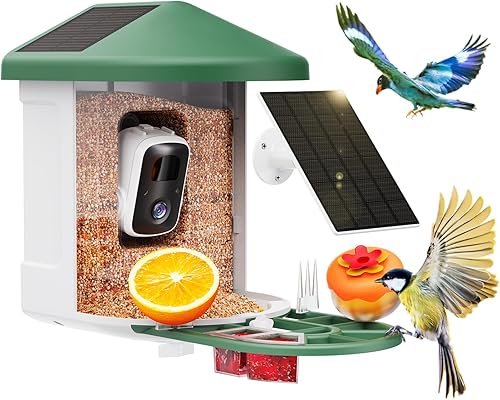
| HARYMOR Solar Smart Bird Feeder | busy households | 2L | 2K HD, 120° view | Tree or wall | 7.1 |
| HARYMOR 2K Solar Smart Bird Feeder | varied yard layouts | 1.5L | 2K HD, 120° view | Tree strap, wall bracket or pole; pole sold separately | 6.9 |
| Minikey 3K Smart Bird Feeder | shared family viewing | 1.25L | 160° view; resolution details conflict | Tree or wall; pole mounting also described | 6.7 |
HARYMOR Solar Smart Bird Feeder: Best for busy households
- 2L seed container
- 2K video
- Built-in and external solar panels
- 2.4GHz Wi-Fi
The largest seed container here suits households that want more room between refills. Its separate solar panel gives you another way to reach sunlight.
Pros
- Largest seed container among these picks
- Built-in and external solar panels
- Cloud or memory card storage
Cons
- Does not support 5GHz Wi-Fi
- Memory card sold separately
- AI identification requires a subscription
The HARYMOR Solar Smart Bird Feeder suits people who want more seed capacity between refills. Its 2L hopper is the largest in this group, making it the strongest starting point for a regularly visited feeding spot.
The camera combines 2K video, a 120° view and 3X magnification. Arrival alerts include snapshots, so you can decide whether to open the app rather than checking live video throughout the day.
Its built-in and external solar panels give you two places to collect sunlight. This helps when the best camera position and the sunniest panel position aren't exactly the same.
Choose this model if you have a suitable tree or wall and want to share bird visits with other app users. It fits a household that values routine viewing more than extra feeding accessories.
Skip it if your plan depends on hanging the feeder from a hook: HARYMOR specifies tree or wall mounting. It also won't suit a 5GHz-only network.
Don't fill the hopper to the top just because you can. In a new feeding spot, start with a small amount and increase it as birds begin visiting, so unused seed doesn't sit through repeated damp weather.
Once you've chosen a reachable location, follow our guide to setting up a bird feeder camera.
HARYMOR 2K Solar Smart Bird Feeder: Best for varied yard layouts
- 1.5L seed container
- 2K video
- Tree strap, wall bracket or pole mount
- App-controlled squirrel alarm
Several mounting options help you work around fences, trees and open yard space. Its squirrel alarm needs a tap in the app, so it suits people who can respond to visits.
Pros
- Three mounting options
- Adjustable external solar panel
- Local memory card or cloud storage
Cons
- Pole sold separately
- Alarm is not automatic
- AI identification requires a subscription
The HARYMOR 2K Solar Smart Bird Feeder is the better fit when your yard layout determines the purchase. A tree strap, wall bracket and pole option give you more ways to work around shade, access and camera direction.
Its 1.5L hopper sits between the other two choices. Two roof panels and an adjustable external solar panel let you consider the feeder's viewing angle and the panel's sun exposure separately.
The included fruit fork, jelly cup and honey jar add feeding options. Use only foods suited to the birds you want to attract, and leave those accessories off if you prefer a simple seed routine.
A mesh barrier and app-controlled siren provide squirrel deterrents. The siren is manual, so choose it only if you're comfortable opening the app and responding when a squirrel appears.
Skip this model if you expect an automatic alarm to guard the feeder while you're away. No alarm replaces a sensible location that limits easy squirrel access.
The pole is sold separately, and HARYMOR gives conflicting inch and centimeter measurements for the opening. Before ordering accessories, confirm the pole fit and this model's required Wi-Fi band.
For context on another brand's paid features, read whether Birdfy requires a subscription. Compare the services themselves, since one brand's app terms don't apply to another.
Minikey 3K Smart Bird Feeder: Best for shared family viewing
- 160° view
- Night vision
- Solar panels
- 2.4GHz Wi-Fi
The wider view and Minikey's stated support for 30+ shared users suit families watching from different homes. Choose it for those features rather than the resolution in its name.
Pros
- Widest stated view among these picks
- Detachable tray for cleaning
- Minikey says sharing supports 30+ users
Cons
- Smallest seed container here
- Conflicting camera resolution details
- Memory card sold separately
The Minikey 3K Smart Bird Feeder suits families who want several people to enjoy the same feeder. Minikey says it supports 30+ shared users, making shared access a clearer reason to choose it than the resolution in its name.
Its 160° view is the widest here. That can help show activity around the feeding area, though a wider view won't necessarily make each bird look larger.
Minikey gives conflicting 3K and 2K resolution details, along with inconsistent solar panel specifications. Choose it for the viewing angle and sharing features rather than a particular video or solar wattage promise.
The 1.25L seed container is the smallest of these picks. It suits someone who can reach the feeder easily and doesn't mind checking seed more often.
A detachable tray helps with cleaning, and a small nectar feeder adds another feeding option. Leave the nectar attachment unused if you can't keep up with its separate cleaning needs.
Skip Minikey if fewer refill trips are your main goal. Also skip it if a specific resolution is essential to your choice.
Choose one person to manage setup, storage and account access before inviting others. That gives the family a clear contact for charging, cleaning and app changes.
What should you check before choosing a budget camera feeder?
Check connection, access and ongoing costs before comparing extra app tools. Those three checks determine whether a feeder will fit your yard and remain pleasant to use.
Does a bird feeder camera under 100 dollars fit your whole setup?
A budget camera feeder should fit the equipment you already have and the care you can provide. Count a needed pole, memory card and mounting hardware alongside the feeder itself.
Separate essentials from extras. Secure mounting and suitable food come first; automatic species suggestions can wait until you know whether you enjoy watching and saving visits.
For a gift, think about the recipient's routine as well as their interest in birds. Someone who enjoys garden chores may welcome feeding accessories, while someone with limited reach needs an easy refill position.
Will your home network reach the feeder?
A usable outdoor Wi-Fi signal matters more than a strong signal beside your router. The first HARYMOR and Minikey require 2.4GHz Wi-Fi and don't support 5GHz.
A router can offer both bands even when your phone usually uses the faster one. Check your router settings before assuming you'll need new equipment.
Take your phone to the planned spot and check reception as an initial screen. The camera still needs its own connection check there before you fasten everything permanently.
Walls, metal fences and distance can weaken the connection. Moving the feeder closer to the house may solve more than changing camera settings.
Can you reach it without a ladder?
Choose a location where you can refill, clean and recharge safely. A camera feeder that is awkward to reach is likely to get less care than one at a comfortable working height.
Leave space to open the hopper and remove any cleaning parts. Think about where your hands will go once the feeder is fixed against a tree or fence.
A pole may offer useful placement freedom, but it needs a stable base and compatible hardware. Our guide to hanging or mounting a smart bird feeder explains placement considerations before you commit to a spot.
How should you compare video, storage and subscriptions?
Choose video for the view you want, storage for the clips you want to keep and paid identification only if it adds value for you. These are separate decisions, even when an app presents them together.
Camera framing matters as much as resolution
A useful view shows the bird's head and feeding position without filling the frame with empty tray or sky. Camera angle, light and distance all affect how much useful detail you see.
Avoid aiming directly into strong sun where possible. Watch the preview at different times of day, since a clear morning view may look very different in late afternoon.
For the second HARYMOR, the brand suggests tilting the camera down about 15° to improve the feeding view. Adjust gradually so you don't cut off the heads of taller visitors.
Local storage suits people who want control over saved clips
All three feeders accept a memory card up to 128GB, sold separately, and offer cloud storage. Choose local recording if you prefer keeping recordings on a card, then follow the camera's instructions for card preparation.
A card doesn't automatically make a camera work without Wi-Fi. Local recording, remote playback and phone alerts are different functions, so don't assume they all remain available during a connection loss.
Save favorite moments outside the feeder's recording loop. Neither a card nor temporary cloud storage should be the only home for a clip you want to keep.
Cloud trials and bird identification have different terms
The first HARYMOR and Minikey offer a 2-year trial of 3-day loop cloud storage. That rolling window is useful for recent visits, but older clips need saving before they leave the loop.
AI identification requires a subscription on all three picks. Minikey also offers a 30-day identification trial, which is separate from its cloud storage trial.
Treat automatic identification as a suggested name to check, especially for similar-looking birds. Shape, markings, location and season can help you decide whether the suggestion makes sense.
If avoiding recurring services is a priority, compare bird feeder cameras with no subscription. Decide which functions you need before activating a trial.
How do you place a solar feeder for useful charging?
Place the panel where it receives direct sunlight while keeping the feeder reachable and the camera view useful. Solar reduces charging chores, but weather and shade still affect how much power comes in.
A spot under dense leaves may attract birds yet provide poor charging. Where a separate panel allows it, use a sunnier panel position without stretching or pinching the cable.
HARYMOR recommends more than 12 hours of sunshine per week for the first model and advises facing its panel toward full sun. Start with a full charge, then watch the battery trend over several days.
Frequent wake-ups, live viewing and busy feeding periods can increase power use. If the battery keeps falling, improve sun exposure and review unnecessary alerts before assuming the battery is faulty.
Keep leaves, dust and bird droppings off the panel with gentle cleaning suited to its instructions. Check the panel again as seasons change, since a location sunny in summer may become shaded later.
Our solar bird feeder camera guide covers the trade-offs between panel placement and feeder placement. Keep a practical route for occasional indoor charging during long cloudy periods.
How do you set up a feeder without creating extra chores?
Pair the camera indoors, confirm recording and alerts, then move it outside for a connection check. Finish the app setup before permanent mounting so you can solve account or network problems within easy reach.
Set up the account and recording first
Charge the camera, install the required app and use a strong account password. Follow the instructions for pairing and any available device updates.
Choose local or cloud storage and make sure you understand any trial enrollment screen. Open a saved clip rather than relying only on the live view to confirm that recording is ready.
Invite family members through the app's sharing feature instead of passing around one account password. Give people the access they need and review old invitations when circumstances change.
Check the outdoor view before fastening everything
Place the feeder temporarily at the proposed spot and confirm that live video opens. Look for a stable view of the perch and tray, with limited background movement.
Avoid pointing the camera toward neighbors' windows or private spaces. A tighter view of your own feeding area is more useful for birdwatching and easier to share comfortably.
Secure the feeder so it doesn't sway or twist. Route solar cables away from sharp edges and moving parts, following the mounting instructions.
Begin with food and settings you can manage
Start with a modest amount of suitable seed and skip optional wet foods at first. A simple routine makes it easier to notice whether moisture, squirrels or poor placement need attention.
If motion controls are available, begin with moderate sensitivity and review the results. Constant alerts from moving branches can bury the bird visits you actually want to see.
Change one setting or placement detail at a time. That makes it easier to tell which adjustment improved the view, connection or number of useful recordings.
What care keeps a camera feeder useful for birds?
Keep the food dry, feeding surfaces clean and camera lens clear. Refill according to actual use, rather than leaving a full hopper untouched until it's empty.
Check the food whenever you visit
Look for clumped, damp or moldy seed, especially after wind-driven rain. Remove spoiled food instead of pouring fresh seed over it.
Clear shells and debris from feeding areas and drainage openings. A large hopper stores more seed, but it doesn't remove the need for regular checks.
Use a separate routine for nectar, fruit or jelly. These foods spoil faster than dry seed, so offer only what you can replace and clean promptly.
Clean without soaking the camera
Follow the feeder's instructions for removing washable parts and protecting electronics. Weather-resistant housing doesn't mean the camera should be submerged or sprayed at close range.
Remove food debris before washing, rinse cleaning residue away and let parts dry fully before refilling. Keep cleaning tools separate from those used for your own dishes.
Wipe the lens gently with a suitable soft cloth. A smear or water spot can spoil otherwise useful footage without any change in camera settings.
For a fuller routine, use our guide to cleaning a smart bird feeder. Increase checks during wet weather or heavy bird activity.
Make squirrel access harder before relying on an alarm
Placement is your first defense against repeated seed raids. Nearby branches, fences and other launch points can make a feeder easy to reach.
A siren needs someone to notice and respond, and repeated disturbance can interrupt bird visits too. If squirrels keep returning, rethink access and spilled seed before sounding it more often.
Which common mistakes should you avoid?
Avoid choosing by camera resolution alone or assuming solar power removes maintenance. The best budget choice fits your daily routine, including refilling, cleaning and occasional charging.
Filling a new hopper before birds find it
Birds may take time to accept a new feeder, particularly in a new location. Start small so you can replace stale food without wasting a full hopper.
Keep the feeder in one sensible spot rather than moving it every day. Check the view and food condition while giving birds time to discover it.
Treating a quiet app as proof that no birds visited
Missing alerts can come from connection problems, phone notification settings or depleted power. Check those before changing the food or moving the feeder.
Compare the live view with saved recordings when diagnosing a quiet day. That helps separate a recording issue from a notification issue.
Choosing accessories before deciding on care
Fruit and nectar attachments add feeding choices, but each brings another surface to clean. Leave them unused until you have a reason and a routine for them.
The same rule applies to shared access and paid identification. Add features that help your household enjoy the feeder rather than enabling everything on the first day.
Which budget bird feeder camera should you bring home?
For a bird feeder camera under 100 dollars, choose the model that solves your hardest setup constraint. Confirm the final checkout amount after choosing the right fit.
Pick the HARYMOR Solar Smart Bird Feeder if hopper space matters most and you have a suitable tree or wall. It's the clearest choice for someone who wants a straightforward seed-feeding routine.
Choose the HARYMOR 2K Solar Smart Bird Feeder if several mounting options help you work around your yard. Accept that its alarm requires your attention and a pole requires a separate purchase.
Pick the Minikey 3K Smart Bird Feeder if the wider view and larger sharing group matter more than hopper size. Its resolution details make it a weaker choice for someone buying mainly for video sharpness.
Before ordering, settle on one reachable mounting spot and one storage plan. If none of these fits those needs, use the best bird feeder cameras to compare alternatives.
Our top 3 picks at a glance
-
1
-
2
-
3
Frequently asked questions
Can you get a bird feeder camera under 100 dollars?
Use this shortlist to compare features for that budget, then confirm the amount at checkout; allow room for any memory card, mounting hardware and seed you need. Paid bird identification is a separate decision, so include it only if automatic species suggestions are part of how you want to use the feeder.
Do bird feeder cameras need Wi-Fi?
These app-connected feeders need a compatible Wi-Fi connection for remote viewing and phone alerts. The first HARYMOR and Minikey require 2.4GHz and do not support 5GHz; confirm the second HARYMOR's network requirements before buying and check reception at the actual mounting spot, since walls and distance can weaken an outdoor signal.
Do these cameras require a subscription?
AI bird identification requires a subscription on all three picks; that is separate from storing recordings, so a cloud trial does not mean species recognition stays free. The first HARYMOR and Minikey include a 2-year trial of 3-day loop cloud storage; confirm renewal terms before enabling a paid plan.
Can you save bird feeder camera videos without cloud storage?
Yes, all three picks support local recording on a memory card up to 128GB, sold separately; a card gives you an alternative to cloud storage, but it does not include paid AI identification. Follow the camera's card setup instructions and save favorite clips elsewhere before recordings are overwritten or the card fills.
Will solar power keep a bird feeder camera running all winter?
Solar power depends on available sunlight, so plan for manual charging during dark or cloudy periods; short days, shade and dirty panels can reduce charging. Place the panel where it gets direct light, check battery levels regularly and keep a safe way to reach the camera for charging.


