6 Best Solar Bird Feeder Cameras (October 2026)
The best solar bird feeder cameras include the Bird Buddy Pro Solar Smart Bird Feeder for everyday backyard birdwatching, the NETVUE Birdfy Feeder 1 2K AI Camera for families sharing clips, and the Birdfy 60FPS Solar Smart Bird Feeder for curious bird learners.
On this page (10 sections)
- How we chose these solar bird feeder cameras
- Compare solar bird feeder cameras by video and charging
- The best solar bird feeder cameras for different yards
- Which solar setup fits your yard?
- How much camera resolution do you need?
- How do subscriptions and storage change the choice?
- How should you set up a solar bird feeder camera?
- How do you keep seed, solar panels and cameras clean?
- Which common buying mistakes should you avoid?
- Which solar bird feeder camera should you choose?
The Bird Buddy Pro Solar Smart Bird Feeder is the best solar bird feeder camera for most yards because it combines free core app tools with flexible mounting. Choose Birdfy 60FPS if learning bird names without a paid AI plan matters most, or Kiwibit if you want higher-resolution footage.
The right choice starts with your mounting spot. A feeder needs usable sunlight, a steady Wi-Fi connection and easy access for cleaning, even when its camera and app suit you perfectly.
For a broader comparison, start with our best bird feeder cameras guide. If avoiding recurring fees comes first, compare bird feeder cameras with no subscription.
Our picks at a glance
-
1
 Best for everyday backyard birdwatching
Bird Buddy Pro Solar Smart Bird Feeder
8.6/10 our score
See it on Amazon -
2
 Best for families sharing clips
NETVUE Birdfy Feeder 1 2K AI Camera
8.4/10 our score
See it on Amazon -
3
 Best for curious bird learners
Birdfy 60FPS Solar Smart Bird Feeder
8.2/10 our score
See it on Amazon
- 4
 Check it
Kiwibit Solar 4K HDR Bird Feeder
Best for offering seed variety - 5
 Check it
Kiwibit 2 Mini Solar Bird Feeder
Best for limited mounting space - 6
 Check it
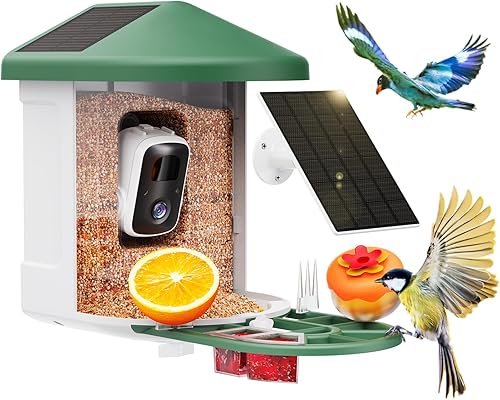
HARYMOR Solar Smart Bird Feeder
Best for busy feeding spots
How we chose these solar bird feeder cameras
We ranked these feeders by camera features, solar setup, useful free tools and everyday upkeep. Bird Buddy leads as a balanced choice, while the other models solve more specific needs.
Our scores reflect those buying priorities. They don't predict battery life in your yard, where shade, weather and camera activity can change charging needs.
We also separated free recording from free identification. A feeder can save useful clips without naming the bird, so paying for AI makes less sense if you mainly want a window into backyard activity.
Capacity mattered alongside access. A larger hopper helps at a busy feeding station, but a smaller feeder can be the better choice when birds visit slowly or the mounting area is tight.
Compare solar bird feeder cameras by video and charging
Compare solar placement and app access first, then decide how much image detail and seed storage you need. A sharper camera won't make up for a shaded panel or a weak connection.
| Product | Best for | Video | Power | Seed capacity | Our score |
|---|---|---|---|---|---|
| Bird Buddy Pro Solar Smart Bird Feeder | everyday backyard birdwatching | 2K; 5MP photos | Rechargeable battery; USB-C or solar | 0.9 L | 8.6 |
| NETVUE Birdfy Feeder 1 2K AI Camera | families sharing clips | 2K | Battery and solar powered | 1.5 L | 8.4 |
| Birdfy 60FPS Solar Smart Bird Feeder | curious bird learners | 1080P; 60FPS high-frame-rate mode | Built-in solar panel and rechargeable battery | 1.3 L | 8.2 |
| Kiwibit Solar 4K HDR Bird Feeder | offering seed variety | 4K; 8MP photos | Dual solar panels and rechargeable battery | Confirm capacity before ordering | 7.4 |
| Kiwibit 2 Mini Solar Bird Feeder | limited mounting space | 4K UHD; 8MP photos | Built-in solar roof and rechargeable battery | 1 L | 7.3 |
| HARYMOR Solar Smart Bird Feeder | busy feeding spots | 2K | Built-in and external solar panels | 2 L | 7.1 |
Kiwibit's larger model has conflicting published capacity figures, so its hopper volume should not decide your purchase. Its clear distinction is the ability to hold two seed blends separately.
The best solar bird feeder cameras for different yards
Choose Bird Buddy for balanced daily use, NETVUE for shared recording, or Birdfy 60FPS for learning about visitors. The Kiwibit models favor high-resolution capture, while HARYMOR favors an active feeding station.
Bird Buddy Pro Solar Smart Bird Feeder: Best for everyday backyard birdwatching
- Solar roof and rechargeable battery
- 2K video and 5MP photos
- Free core tools; paid advanced AI
- 0.9 L seed capacity
A balanced choice for daily birdwatching, with free live viewing, postcards and species ID. The included hanger gives you a branch-mounting option.
Pros
- HDR imaging
- Solar roof included
- Hanger and universal pole mount included
Cons
- Advanced AI features require a subscription
- Smaller seed capacity than several picks
1. Bird Buddy Pro: the solar bird feeder camera for everyday use
Bird Buddy Pro suits someone who wants to check visits, save bird moments and learn common species without building the whole experience around a paid plan. Its 2K video, 5MP photos and HDR offer a middle ground between basic footage and the higher-resolution Kiwibit options.
Free core tools include live streaming, bird postcards, species ID and sharing. Advanced tools such as individual bird recognition and deeper wildlife insights require a subscription, so decide how much detail you want beyond a species name.
The included hanger suits a suitable branch, while the universal mount gives you a pole option. The pole itself is separate, and a wall mount is not included.
Its 0.9 L hopper makes most sense when you can check the feeder often. Skip it if your existing feeder empties quickly and reducing refill trips is your main goal.
Before choosing the branch, check both sunlight and access. Our guide to setting up a bird feeder camera explains how to work through placement and connection.
NETVUE Birdfy Feeder 1 2K AI Camera: Best for families sharing clips
- Solar-assisted power and rechargeable battery
- 2K camera
- Free recording, alerts and 30-day history
- AI recognition requires a subscription
Choose this model for free recording tools and shared family viewing. Its larger hopper also suits a busy feeding spot.
Pros
- Free automatic recording and alerts
- 5GB free cloud storage for saved clips
- Supports more than 20 guests
Cons
- AI recognition requires a subscription
- Requires 2.4GHz Wi-Fi
2. NETVUE Birdfy Feeder 1: for families who want to share visits
NETVUE is a strong fit for a household that cares more about watching clips together than getting an AI label on every visitor. Automatic recording, alerts, live streaming and 30-day video history are free, with 5GB of free cloud storage for collected clips.
It supports more than 20 guests, so sharing needn't fall to one person sending every video. That makes it a useful choice for families spread across different homes.
The camera records 2K video, and the hopper holds 1.5 L. Color night vision adds a way to see activity around the feeder after daylight fades, though nighttime footage shouldn't drive a daytime birdwatching purchase.
AI recognition requires a subscription. Skip this model if free identification is central to your plans, since Birdfy 60FPS addresses that need directly.
Save favorite clips before their history window ends rather than treating recent recordings as a permanent archive. For more ways to compare viewing and sharing tools, see our guide to bird feeder cameras with an app.
Birdfy 60FPS Solar Smart Bird Feeder: Best for curious bird learners
- Built-in solar panel and 5200mAh battery
- 60FPS high-frame-rate capture
- Lifetime free AI bird identification
- 1080P side-view camera
Lifetime free AI identification suits readers who want help naming visitors. Its high-frame-rate mode also lets you slow down fast bird movements.
Pros
- Lifetime free AI bird identification
- 60FPS capture for slowing footage
- Tool-free cleaning design
Cons
- Lower video resolution than the other picks
- Side-mounted camera sets the viewing angle
3. Birdfy 60FPS: for learning bird names and watching movement
Birdfy 60FPS suits a curious beginner who wants lifetime free AI identification and a closer look at bird behavior. Birdfy also provides activity tracking and personalized AI alerts, giving you reasons to return beyond watching a single clip.
Its 1080P side-mounted camera places the bird close in the frame. The high-frame-rate mode captures at 60FPS so you can slow footage afterward to examine a landing, wing flap or takeoff.
That is a different priority from maximum resolution. Choose it for movement and learning; skip it if your main goal is saving higher-resolution still images or video.
The fir wood body has a roof-integrated solar panel, a 1.3 L hopper and a tool-free cleaning design. Wall, pole and tree mounting options let you work around the yard rather than assuming a branch is available.
Free cloud storage retains video for 30 days, so download moments you want to keep. Our Birdfy 60FPS review explains the camera and app tradeoffs in more detail.
Kiwibit Solar 4K HDR Bird Feeder: Best for offering seed variety
- 4K video and 8MP photos
- Dual solar panels and 5200mAh battery
- Detachable dual-seed hopper
- AI features require a subscription
A dual-seed hopper suits buyers who want to offer separate blends. High-resolution capture and included mounting hardware add flexibility.
Pros
- HDR imaging
- Detachable hopper and tray
- Wall, tree strap and pole mounting hardware included
Cons
- AI features require a subscription
- Published capacity figures differ
4. Kiwibit Solar 4K HDR: for offering different seed blends
Choose this Kiwibit if you want separate seed blends and high-resolution capture in one feeder. The detachable dual-seed hopper lets you offer variety without mixing everything together.
Its camera captures 4K video and 8MP photos, with HDR, a 132° lens and black-and-white infrared night vision. Those features suit someone who enjoys saving close views of plumage as well as watching live.
Dual solar panels sit in the roof, and wall, tree strap and pole mounting hardware is included. The detachable hopper and tray also give you feeding parts to remove for routine cleaning.
AI tools require Kiwibit Premium after a 30-day free trial. Skip it if free bird identification is essential, or if you only use one seed blend and have no clear need for higher-resolution footage.
Confirm the hopper capacity before ordering if refill frequency matters, because Kiwibit's published figures differ. For the broader app-cost questions, use our bird feeder camera subscription guide alongside the model-specific free features above.
Kiwibit 2 Mini Solar Bird Feeder: Best for limited mounting space
- 4K video and 8MP photos
- Built-in solar roof
- 1 L seed capacity
- AI features require Kiwibit Premium
A compact body suits a smaller mounting area without giving up high-resolution capture. The removable camera helps separate electronics from feeder care.
Pros
- Compact 7 x 5.4 x 8.2 in body
- Removable camera module
- Micro SD support up to 512GB
Cons
- AI features require a subscription
- Micro SD card is not included
5. Kiwibit 2 Mini: for a smaller mounting area
Kiwibit 2 Mini suits buyers working with limited mounting space who still want high-resolution capture. Its 7 x 5.4 x 8.2 in body is smaller in each dimension than the larger Kiwibit here.
It records 4K UHD video and 8MP photos, with 1080P/60FPS playback and infrared night vision. A built-in solar roof keeps the panel and feeder together.
The removable camera module is useful during feeder care because you can separate the electronics before cleaning feeding parts. Leave enough clearance around the mount to remove both the camera and the 1 L seed container.
Local storage supports a Micro SD card up to 512GB, which is not included. Choose that option if keeping footage on a card matters, while still planning for Wi-Fi when using connected app features.
Skip the Mini if your main aim is a large seed reserve or free AI identification. Its AI tools require Kiwibit Premium after a 30-day trial, so compact size is the stronger reason to choose it.
HARYMOR Solar Smart Bird Feeder: Best for busy feeding spots
- Built-in and external solar panels
- 2K video and 120° lens
- 2 L seed capacity
- 2.4GHz Wi-Fi
The largest confirmed hopper here suits yards where birds empty seed quickly. An external panel gives you another solar surface to position.
Pros
- Largest confirmed seed capacity in this group
- Two solar panels
- Memory card support up to 128GB
Cons
- Detailed AI bird information requires an app subscription
- Cannot hang from a branch
6. HARYMOR: for a feeder that empties quickly
HARYMOR suits an established feeding spot where birds already use seed quickly. Its 2 L hopper is the largest confirmed capacity here, making it the clearest choice when frequent refills are the problem.
A built-in 3W solar panel works alongside an external 3W panel. The extra panel gives you another surface to position, but check the cable route and keep it clear of places where it could snag.
The camera records 2K video through a 120° lens. Storage options include a memory card up to 128GB, sold separately, or 3-day loop cloud recording during a 2-year trial.
Detailed information about identified birds requires an app subscription. A cloud trial also differs from permanent free storage, so decide where you'll keep favorite clips after that period.
Skip HARYMOR if you need a feeder that hangs from a branch. It mounts to a tree or wall, and a large hopper offers little benefit if seed sits unused for long periods.
Which solar setup fits your yard?
Choose an integrated solar roof for a tidy installation, provided the feeder itself can sit in useful sunlight. An external panel gives you another position to consider, within the supplied cable's reach.
Check the spot in the morning, around midday and later in the afternoon. A place that looks sunny during installation may spend much of the day under a roof shadow or tree canopy.
Think ahead to seasonal changes. Leaves, a lower winter sun and nearby buildings can alter how much light reaches the panel.
Solar charging supplements a battery; it doesn't remove the need for charging access. Cloudy spells and frequent camera activity can leave you needing a manual charge, so avoid mounts that require a difficult climb.
Our guide to charging Bird Buddy explains charging habits, while how to hang or mount a smart bird feeder helps you plan safe access.
How much camera resolution do you need?
Choose higher resolution for saved image detail, and frame-rate features for studying movement. For checking which birds arrived while you were busy, camera position and useful clips may matter more than the largest resolution number.
A bird needs to be well placed in the frame. A wide view can show more of the feeding area, while a close side view emphasizes the bird's feeding posture and movements.
Avoid pointing the camera straight toward bright sky when you can adjust the location. Strong backlighting can make feather markings harder to see, even with HDR.
Don't confuse capture modes with each other. A camera's highest video resolution and its higher-frame-rate mode may be separate choices rather than features you use together.
Night vision is mainly a way to inspect after-dark activity. It shouldn't outweigh daylight framing if your goal is watching the birds that visit during normal feeding hours.
How do subscriptions and storage change the choice?
Choose by what remains available after a trial ends, rather than by the trial's longest feature list. Live viewing, automatic recording, AI labels and cloud retention are separate parts of the experience.
Birdfy 60FPS is the direct choice when free AI identification matters most. NETVUE suits someone who wants free recording tools and can identify birds another way.
Bird Buddy's free core species ID serves a different need from its paid individual-bird tools. Decide whether you want a name for the visitor or a deeper collection of insights.
Treat AI names as a starting point when a bird looks unusual. Compare visible markings, size and location before accepting a surprising identification.
For storage, ask how long clips remain available and how you'll export them. A memory card provides local storage on supported models, but it doesn't establish that connected app functions operate without Wi-Fi.
Download important clips on a routine schedule. A short history window can be enough for daily viewing while still being too short for someone who checks the app only occasionally.
How should you set up a solar bird feeder camera?
Charge and connect the camera before mounting it, then confirm the live view at the final location. This separates account and pairing problems from weak outdoor Wi-Fi.
All six picks use 2.4GHz Wi-Fi. A router that also offers 5GHz can still be suitable, but the feeder must connect through the supported band.
Work through these steps before adding seed:
- Create the app account and complete the model's pairing steps near your router.
- Carry the charged camera to the planned spot and check the connection there.
- Confirm the solar surface receives light and the mount supports the filled feeder.
- Frame the perch and feeding area, keeping neighboring windows and private spaces out of view.
- Check that you can remove feeding parts and reach charging connections.
- Add a modest amount of suitable seed and allow birds time to approach.
Place the feeder where birds have a clear approach, and avoid creating an easy jump from nearby structures for squirrels. Our squirrel-proofing guide for camera feeders helps you plan around those routes.
If birds don't arrive immediately, keep the feeding area calm rather than moving the feeder every day. Familiar food and a steady location give them time to find it.
How do you keep seed, solar panels and cameras clean?
Inspect the feeder often and clean it on a regular schedule, with extra attention after wet weather. Solar power can reduce charging work, but it doesn't reduce the need to care for shared feeding surfaces.
Check for damp seed, clumps, droppings and blocked drainage. Remove spoiled food rather than burying it under a fresh refill.
Fill for actual demand. At a quiet new feeder, a partly filled hopper makes it easier to replace seed before it sits too long.
Separate removable electronics before washing feeding parts, following the model's care instructions. Weather-resistant housings don't make charging ports or camera modules safe to soak.
Let cleaned parts dry fully before adding seed. Our smart bird feeder cleaning guide covers the care routine in more detail.
Keep the lens and solar surface clear of dust, droppings and sap using the approved cleaning method. A dirty lens blocks the view, while debris on a panel blocks light.
For feeding hygiene and broader bird-care advice, consult Cornell Lab's Project FeederWatch guidance. Pause feeding and follow wildlife guidance if sick birds appear around the station.
Which common buying mistakes should you avoid?
Avoid choosing on resolution or solar power alone. The biggest mistakes involve where the feeder will live and what you expect the app to do.
- Buying before checking Wi-Fi: A phone's connection indoors doesn't prove the planned outdoor mounting spot has coverage.
- Assuming solar means no charging: Keep access to the camera and its manual charging method.
- Choosing capacity without considering demand: More seed is useful only when birds use it while it stays fresh.
- Treating a free trial as a permanent feature: Check which AI and storage tools need a plan later.
- Mounting too high for routine care: Easy refilling and cleaning matter every week.
- Expecting any feeder to attract every bird: Seed choice and feeding style affect visitors, regardless of camera features.
- Using constant live viewing without watching battery level: Long viewing sessions add power demand.
- Leaving favorite clips in temporary history: Export them before automatic deletion.
Which solar bird feeder camera should you choose?
Choose your solar bird feeder camera by the job you want it to do. If you want straightforward daily birdwatching and can refill regularly, Bird Buddy Pro is the balanced choice.
Pick NETVUE for shared family viewing and free recording tools. Choose Birdfy 60FPS when learning bird names without a paid AI plan matters more than higher-resolution capture.
Choose the larger Kiwibit for separate seed blends, or the Mini when mounting space is tight. Pick HARYMOR when birds already empty your feeder quickly and you have a suitable tree or wall mount.
Before ordering, settle three things: the sunny mounting spot, Wi-Fi coverage there and the app features you'll keep using after any trial. If those needs point toward another camera style, return to our best bird feeder cameras guide.
Our top 3 picks at a glance
-
1
Best for everyday backyard birdwatching
Bird Buddy Pro Solar Smart Bird Feeder
8.6/10 our score
See it on Amazon -
2
Best for families sharing clips
NETVUE Birdfy Feeder 1 2K AI Camera
8.4/10 our score
See it on Amazon -
3
Best for curious bird learners
Birdfy 60FPS Solar Smart Bird Feeder
8.2/10 our score
See it on Amazon
Frequently asked questions
Do solar bird feeder cameras need direct sunlight?
Direct sunlight gives the panel a better chance of keeping the battery charged. Check the intended spot at several times of day, since a roof or leafy branch can block the panel later.
Solar supplements battery power, so keep a practical way to bring the camera in for charging.
Do solar bird feeder cameras work without Wi-Fi?
These six models use 2.4GHz Wi-Fi for their connected app features. Local memory card support does not establish that setup, alerts or live viewing work without a network connection.
Check signal at the feeder's planned position before mounting, especially across brick walls or near the far end of a yard.
Can you use a solar bird feeder camera without a subscription?
Yes, but choose by the features you want to keep free. Birdfy 60FPS includes lifetime free AI identification, while NETVUE includes recording and alerts without paid AI.
Bird Buddy offers free core species ID.
Both Kiwibit models charge for AI features, and HARYMOR charges for detailed bird information.
Which solar bird feeder camera has the largest seed capacity?
HARYMOR has the largest confirmed seed container in this group at 2 L. It suits an active feeder that empties quickly, but extra capacity is less useful in a quiet yard.
Fill only as much as birds use while the seed stays fresh, and inspect it after wet weather.



